OTel

OpenTelemetry (OTel) 是一个开源项目,旨在为分布式系统(例如微服务架构)中的 telemetry 数据采集、处理和导出提供一个供应商无关的标准。它可以帮助开发者更轻松地分析软件的性能和行为,从而便于诊断和解决应用问题。

术语

术语说明
Trace提交到 OTel Server 的数据,是一组相关事件或操作的集合,用于跟踪分布式系统中请求的流转;每个 Trace 由多个 Span 组成。
SpanTrace 中的一个独立操作或事件,包含开始时间、持续时间以及其他相关信息。
OTel Server能够接收和存储 Trace 数据的 OTel 服务器,例如 Jaeger、Prometheus 等。
Jaeger一个开源的分布式 tracing 系统,用于监控和排查微服务架构,支持与 OpenTelemetry 集成。
Attributes附加到 Trace 或 Span 上的键值对,用于提供额外的上下文信息。包括 Resource Attributes 和 Span Attributes;更多信息请参见 Attributes
Sampler决定是否对 Trace 进行采样并上报的策略组件。可以配置不同的采样策略,例如全量采样、比例采样等。
ALB (Another Load Balancer)一种在集群内可用节点之间分发网络请求的软件或硬件设备;平台中使用的负载均衡器(ALB)是一个七层软件负载均衡器,可以配置为使用 OTel 监控流量。ALB 支持将 Trace 提交到指定的 Collector,并允许使用不同的采样策略;同时也支持配置是否在 Ingress 层提交 Trace。
FT (Frontend)ALB 的端口配置,用于指定端口级配置。
Rule端口(FT)上的路由规则,用于匹配特定路由。
HotROD (Rides on Demand)Jaeger 提供的一个示例应用,用于演示 distributed tracing 的使用;更多详情请参见 Hot R.O.D. - Rides on Demand
hotrod-with-proxy通过环境变量指定 HotROD 内部微服务的地址;更多详情请参见 hotrod-with-proxy

前提条件

  • 确保存在可用的 ALB:创建或使用现有的 ALB。以下示例中使用 <otel-alb> 作为 ALB 名称。有关创建 ALB 的说明,请参见 配置 ALB

  • 确保存在 OTel 数据上报服务器地址:此地址后文将称为 <jaeger-server>

操作步骤

更新 ALB 配置

  1. 在集群的主节点上,使用 CLI 工具执行以下命令以编辑 ALB 配置。

    kubectl edit alb2 -n cpaas-system <otel-alb> # Replace <otel-alb> with the actual ALB name
  2. spec.config 部分下添加以下字段。

    otel:
      enable: true
      exporter:
        collector:
          address: '<jaeger-server>' # Replace <jaeger-server> with the actual OTel data reporting server address
          request_timeout: 1000

    完成后的示例配置:

    spec:
      address: 192.168.1.1
      config:
        otel:
         enable: true
         exporter:
           collector:
             address: "http://jaeger.default.svc.cluster.local:4318"
             request_timeout: 1000
        antiAffinityKey: system
        defaultSSLCert: cpaas-system/cpaas-system
        defaultSSLStrategy: Both
        gateway:
        ...
    type: nginx
  3. 执行以下命令保存更新。更新后,ALB 默认启用 OpenTelemetry,且所有请求的 Trace 信息都会上报到 Jaeger Server。

    :wq

相关操作

在 Ingress 中配置 OTel

  • 在 Ingress 上启用或禁用 OTel

    通过配置是否在 Ingress 上启用 OTel,可以更好地监控和调试应用的请求流,通过跟踪请求在不同服务之间的传播来识别性能瓶颈或错误。

    操作步骤

    在 Ingress 的 metadata.annotations 字段下添加以下配置:

    nginx.ingress.kubernetes.io/enable-opentelemetry: "true"

    参数说明:

    • nginx.ingress.kubernetes.io/enable-opentelemetry:设置为 true 时,表示 Ingress controller 在处理经过此 Ingress 的请求时启用 OpenTelemetry 功能,即会采集并上报请求的 Trace 信息。设置为 false 或删除该注解时,表示不会采集或上报请求的 Trace 信息。
  • 在 Ingress 上启用或禁用 OTel Trust

    OTel Trust 决定 Ingress 是否信任并使用入站请求中的 Trace 信息(例如 trace ID)。

    操作步骤

    在 Ingress 的 metadata.annotations 字段下添加以下配置:

    nginx.ingress.kubernetes.io/opentelemetry-trust-incoming-span: "true"

    参数说明:

    • nginx.ingress.kubernetes.io/opentelemetry-trust-incoming-span:设置为 true 时,Ingress 会继续使用已存在的 Trace 信息,有助于保持跨服务 tracing 的一致性,使整个请求链路能够在分布式 tracing 系统中被完整追踪和分析。设置为 false 时,将为请求生成新的 tracing 信息,这可能会导致请求在进入 Ingress 后被视为新的 tracing 链路的一部分,从而中断跨服务 trace 的连续性。
  • 在 Ingress 上添加不同的 OTel 配置

    此配置允许您针对不同的 Ingress 资源自定义 OTel 的行为和数据导出方式,从而对每个服务的 tracing 策略或目标进行精细化控制。

    操作步骤

    在 Ingress 的 metadata.annotations 字段下添加以下配置:

    apiVersion: networking.k8s.io/v1
    kind: Ingress
    metadata:
      annotations:
        alb.ingress.cpaas.io/otel: >
          {
             "enable": true,
             "exporter": {
                 "collector": {
                     "address": "<jaeger-server>", # Replace <jaeger-server> with the actual OTel data reporting server address, e.g., "address": "http://128.0.0.1:4318"
                     "request_timeout": 1000
                 }
             }
          }

    参数说明:

    • exporter:指定如何将采集到的 Trace 数据发送到 OTel Collector(OTel 数据上报服务器)。
    • address:指定 OTel Collector 的地址。
    • request_timeout:指定请求超时时间。

在应用中使用 OTel

以下配置展示了完整的 OTel 配置结构,可用于定义如何在应用中启用和使用 OTel 功能。

在集群主节点上,使用 CLI 工具执行以下命令以获取完整的 OTel 配置结构。

kubectl get crd alaudaloadbalancer2.crd.alauda.io -o json|jq ".spec.versions[2].schema.openAPIV3Schema.properties.spec.properties.config.properties.otel"

回显结果:

{
    "otel": {
        "enable": true
    }
    "exporter": {
        "collector": {
            "address": ""
          },
    },
    "flags": {
        "hide_upstream_attrs": false
        "notrust_incoming_span": false
        "report_http_request_header": false
        "report_http_response_header": false
    },
    "sampler": {
        "name": "",
        "options": {
            "fraction": ""
            "parent_name": ""
          },
      },
 }

参数说明:

参数说明
otel.enable是否启用 OTel 功能。
exporter.collector.addressOTel 数据上报服务器的地址,支持 http/https 协议和域名。
flags.hide_upstream_attrs是否上报上游规则的信息。
flag.notrust_incoming_span是否信任并使用入站请求中的 OTel Trace 信息(例如 trace ID)。
flags.report_http_request_header是否上报请求头。
flags.report_http_response_header是否上报响应头。
sampler.name采样策略名称;详情请参见 Sampling Strategies
sampler.options.fraction采样率。
sampler.options.parent_nameparent_base 采样策略的父策略。

继承

默认情况下,如果 ALB 配置了某些 OTel 参数而 FT 未配置,则 FT 会继承 ALB 的参数作为自身配置;也就是说,FT 继承 ALB 的配置,而 Rule 可以同时继承 ALB 和 FT 的配置。

  • ALB:ALB 上的配置通常是全局和默认配置。您可以在这里配置诸如 Collector 地址之类的全局参数,这些参数会被下层的 FT 和 Rule 继承。

  • FT:FT 可以继承 ALB 的配置,这意味着 FT 上未配置的某些 OTel 参数将使用 ALB 中的配置。不过,FT 也可以进一步细化;例如,您可以选择仅在 FT 上有选择地启用或禁用 OTel,而不影响其他 FT 或 ALB 的全局设置。

  • Rule:Rule 可以继承 ALB 和 FT 的配置。不过,Rule 也可以进一步细化;例如,某个特定 Rule 可以选择不信任传入的 OTel Trace 信息,或者调整采样策略。

操作步骤

通过在 ALB、FT 和 Rule 的 YAML 文件中配置 spec.config.otel 字段,您可以添加与 OTel 相关的配置。

补充说明

Sampling Strategies

参数说明
always on始终上报所有 tracing 数据。
always off永不上报 tracing 数据。
traceid-ratio根据 traceid 决定是否上报。traceparent 的格式为 xx-traceid-xx-flag,其中 traceid 的前 16 个字符表示一个 32 位十六进制整数。如果该整数小于 fraction 乘以 4294967295(即 (2^32-1)),则会上报。
parent-base根据请求中 traceparent 的 flag 部分决定是否上报。当 flag 为 01 时会上报;例如:curl -v "http://$ALB_IP/" -H 'traceparent: 00-xx-xx-01';当 flag 为 02 时则不上报;例如:curl -v "http://$ALB_IP/" -H 'traceparent: 00-xx-xx-02'

Attributes

  • Resource Attributes

    这些属性默认会上报。

    参数说明
    hostnameALB Pod 的主机名
    service.nameALB 的名称
    service.namespaceALB 所在的命名空间
    service.type默认为 ALB
    service.instance.idALB Pod 的名称
  • Span Attributes

    • 默认上报的属性:

      参数说明
      http.status_code状态码
      http.request.resend_count重试次数
      alb.rule.rule_name此请求匹配到的规则名称
      alb.rule.source_type此请求匹配到的规则类型,当前仅为 Ingress
      alb.rule.source_nameIngress 的名称
      alb.rule.source_nsIngress 所在的命名空间
    • 默认上报,但可通过修改 flag.hide_upstream_attrs 字段排除的属性:

      参数说明
      alb.upstream.svc_name流量转发到的 Service(内部路由)名称
      alb.upstream.svc_ns被转发到的 Service(内部路由)所在的命名空间
      alb.upstream.peer转发到的 Pod 的 IP 地址和端口
    • 默认不报告,但可通过修改 flag.report_http_request_header 字段进行上报的属性:

      参数说明
      **http.request.header.<header>**请求头
    • 默认不报告,但可通过修改 flag.report_http_response_header 字段进行上报的属性:

      参数说明
      **http.response.header.<header>**响应头

配置示例

以下 YAML 配置会部署一个 ALB,并使用 Jaeger 作为 OTel server,使用 Hotrod-proxy 作为演示后端。通过配置 Ingress 规则,当客户端请求 ALB 时,流量将被转发到 HotROD。此外,HotROD 内部微服务之间的通信也会通过 ALB 进行路由。

  1. 将以下 YAML 保存为名为 all.yaml 的文件。

    apiVersion: apps/v1
    kind: Deployment
    metadata:
      name: hotrod
    spec:
      replicas: 1
      selector:
        matchLabels:
          service.cpaas.io/name: hotrod
          service_name: hotrod
      template:
        metadata:
          labels:
            service.cpaas.io/name: hotrod
            service_name: hotrod
        spec:
          containers:
            - name: hotrod
              env:
                - name: PROXY_PORT
                  value: '80'
                - name: PROXY_ADDR
                  value: 'otel-alb.default.svc.cluster.local:'
                - name: OTEL_EXPORTER_OTLP_ENDPOINT
                  value: 'http://jaeger.default.svc.cluster.local:4318'
              image: theseedoaa/hotrod-with-proxy:latest
              imagePullPolicy: IfNotPresent
              command: ['/bin/hotrod', 'all', '-v']
    ---
    apiVersion: networking.k8s.io/v1
    kind: Ingress
    metadata:
      name: hotrod-frontend
    spec:
      ingressClassName: otel-alb
      rules:
        - http:
            paths:
              - backend:
                  service:
                    name: hotrod
                    port:
                      number: 8080
                path: /dispatch
                pathType: ImplementationSpecific
              - backend:
                  service:
                    name: hotrod
                    port:
                      number: 8080
                path: /frontend
                pathType: ImplementationSpecific
    ---
    apiVersion: networking.k8s.io/v1
    kind: Ingress
    metadata:
      name: hotrod-customer
    spec:
      ingressClassName: otel-alb
      rules:
        - http:
            paths:
              - backend:
                  service:
                    name: hotrod
                    port:
                      number: 8081
                path: /customer
                pathType: ImplementationSpecific
    ---
    apiVersion: networking.k8s.io/v1
    kind: Ingress
    metadata:
      name: hotrod-route
    spec:
      ingressClassName: otel-alb
      rules:
        - http:
            paths:
              - backend:
                  service:
                    name: hotrod
                    port:
                      number: 8083
                path: /route
                pathType: ImplementationSpecific
    ---
    apiVersion: v1
    kind: Service
    metadata:
      name: hotrod
    spec:
      internalTrafficPolicy: Cluster
      ipFamilies:
        - IPv4
      ipFamilyPolicy: SingleStack
      ports:
        - name: frontend
          port: 8080
          protocol: TCP
          targetPort: 8080
        - name: customer
          port: 8081
          protocol: TCP
          targetPort: 8081
        - name: router
          port: 8083
          protocol: TCP
          targetPort: 8083
      selector:
        service_name: hotrod
      sessionAffinity: None
      type: ClusterIP
    ---
    apiVersion: apps/v1
    kind: Deployment
    metadata:
      name: jaeger
    spec:
      replicas: 1
      selector:
        matchLabels:
          service.cpaas.io/name: jaeger
          service_name: jaeger
      template:
        metadata:
          labels:
            service.cpaas.io/name: jaeger
            service_name: jaeger
        spec:
          containers:
            - name: jaeger
              env:
                - name: LOG_LEVEL
                  value: debug
              image: jaegertracing/all-in-one:1.58.1
              imagePullPolicy: IfNotPresent
          hostNetwork: true
          tolerations:
            - operator: Exists
    ---
    apiVersion: v1
    kind: Service
    metadata:
      name: jaeger
    spec:
      internalTrafficPolicy: Cluster
      ipFamilies:
        - IPv4
      ipFamilyPolicy: SingleStack
      ports:
        - name: http
          port: 4318
          protocol: TCP
          targetPort: 4318
      selector:
        service_name: jaeger
      sessionAffinity: None
      type: ClusterIP
    ---
    apiVersion: crd.alauda.io/v2
    kind: ALB2
    metadata:
      name: otel-alb
    spec:
      config:
        loadbalancerName: otel-alb
        otel:
          enable: true
          exporter:
            collector:
              address: 'http://jaeger.default.svc.cluster.local:4318'
              request_timeout: 1000
        projects:
          - ALL_ALL
        replicas: 1
        resources:
          alb:
            limits:
              cpu: 200m
              memory: 2Gi
            requests:
              cpu: 50m
              memory: 128Mi
          limits:
            cpu: '1'
            memory: 1Gi
          requests:
            cpu: 50m
            memory: 128Mi
      type: nginx
  2. 在 CLI 工具中执行以下命令,部署 Jaeger、ALB、HotROD 以及所有测试所需的 CR。

    kubectl apply ./all.yaml
  3. 执行以下命令以获取 Jaeger 的访问地址。

    export JAEGER_IP=$(kubectl get po -A -o wide |grep jaeger | awk '{print $7}');echo "http://$JAEGER_IP:16686"
  4. 执行以下命令以获取 otel-alb 的访问地址。

    export ALB_IP=$(kubectl get po -A -o wide|grep otel-alb | awk '{print $7}');echo $ALB_IP
  5. 执行以下命令通过 ALB 向 HotROD 发送请求。此时,ALB 会将 Trace 上报到 Jaeger。

    curl -v "http://<$ALB_IP>:80/dispatch?customer=567&nonse=" # Replace <$ALB_IP> in the command with the access address of otel-alb obtained in the previous procedure
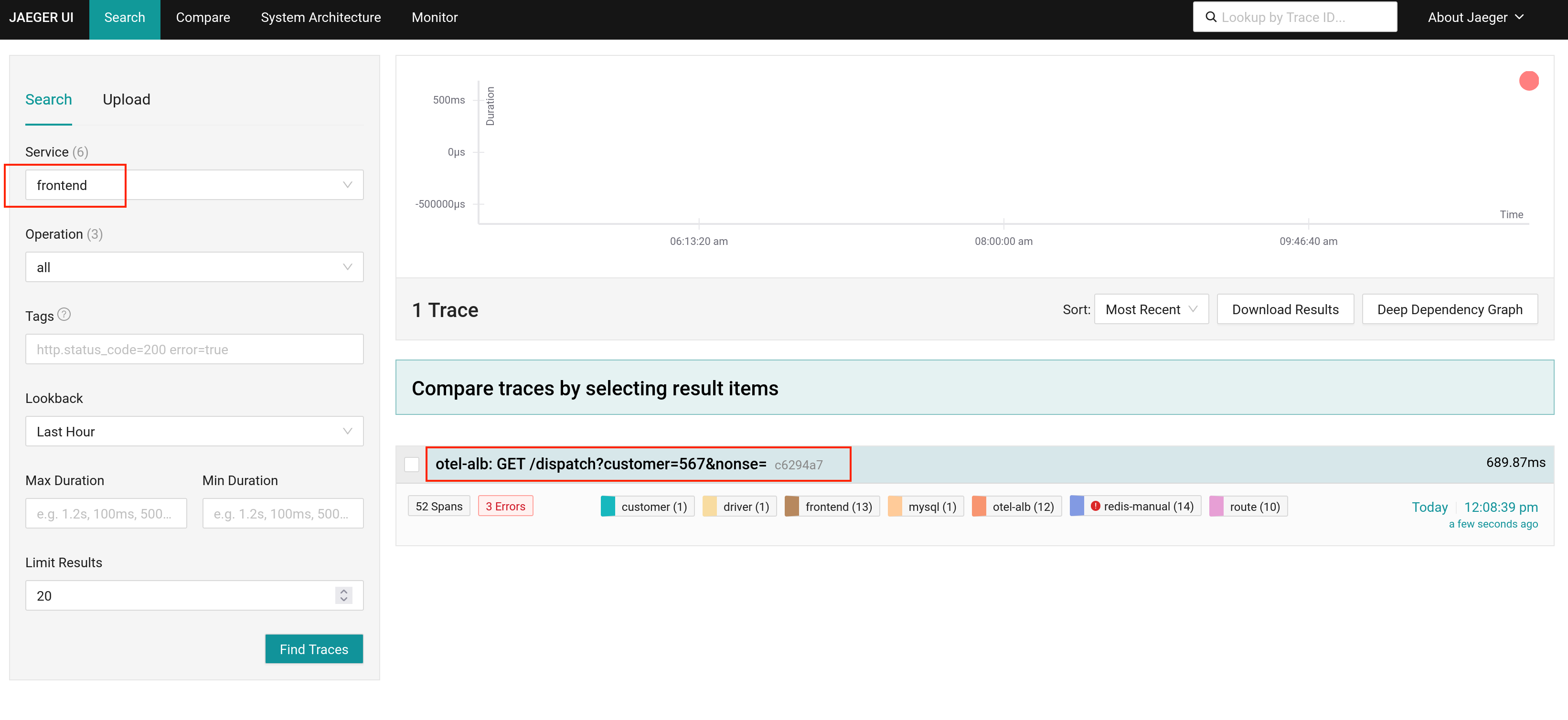
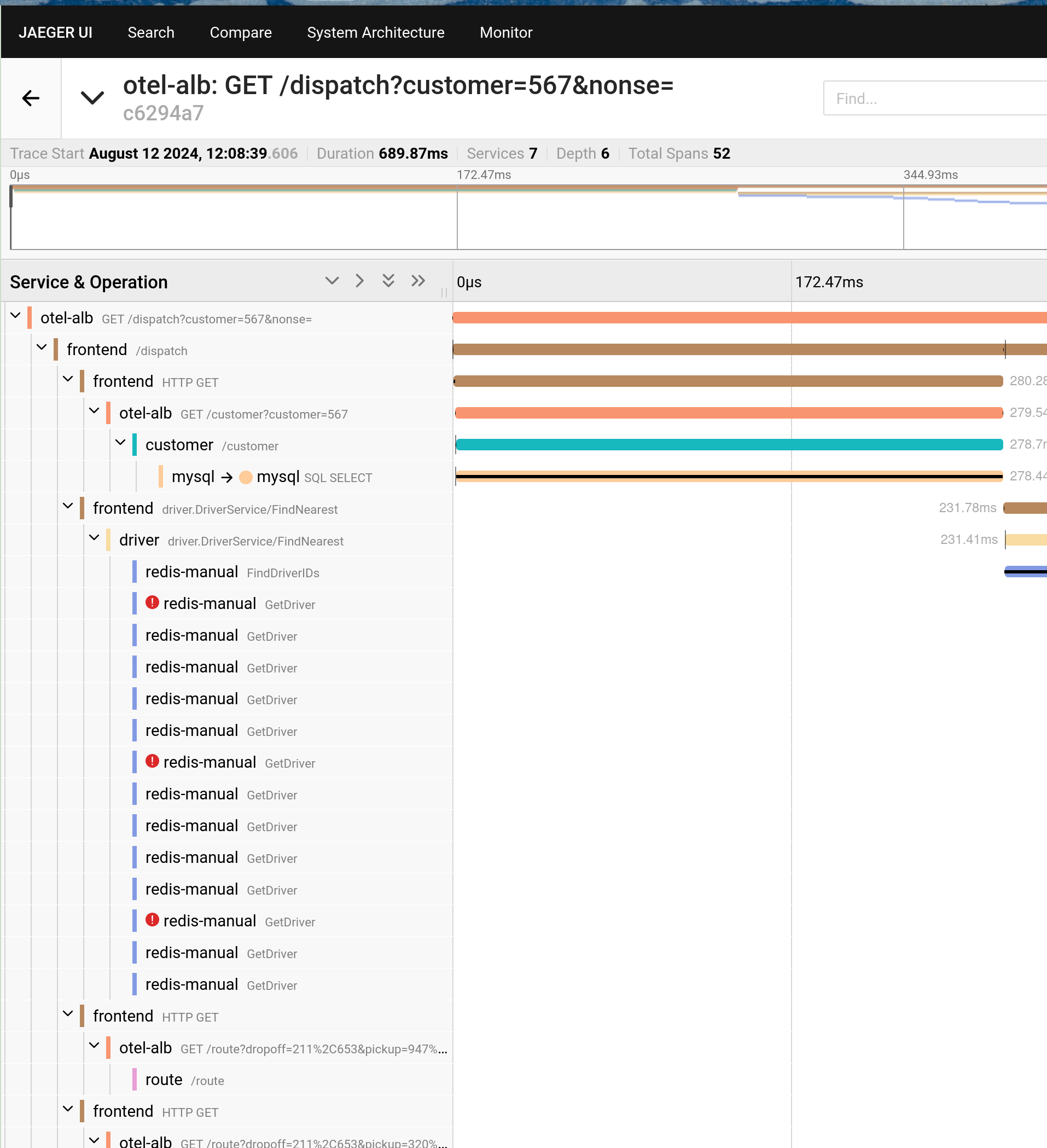
  6. 打开在 步骤 3 中获取的 Jaeger 访问地址以查看结果。