安装多主模式多网络 mesh

在两个集群上的多主模式多网络拓扑中安装 Istio。

NOTE

在此操作步骤中,CLUSTER1East 集群,CLUSTER2West 集群。

你可以将这些说明调整为适用于跨越两个以上集群的 mesh。

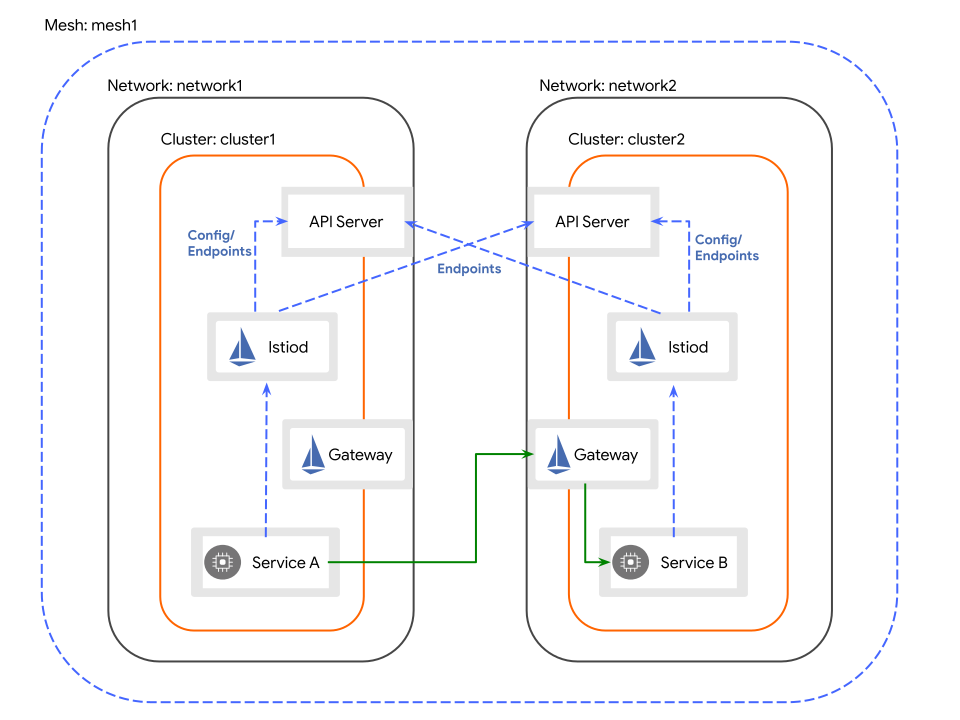
拓扑

跨越集群边界的服务工作负载通过专用于 east-west 流量的 gateway 间接通信。 每个集群中的 gateway 必须可从另一个集群访问。

多主模式多网络拓扑

前提条件

  • 你已在构成 mesh 的所有集群上安装了 Alauda Container Platform Networking for Multus 插件,并且 kube-ovn 必须为 v4.1.5 或更高版本。
  • 你可以访问两个支持外部负载均衡器的集群。
  • 你已在构成 mesh 的所有集群上安装了 Alauda Service Mesh v2 Operator。
  • 你已完成为多集群 mesh 创建证书
  • 你已完成将证书应用到多集群拓扑
  • 你已在本地安装 istioctl,以便使用它运行这些操作步骤。

操作步骤

创建定义要安装的 Istio 版本的 ISTIO_VERSION 环境变量

export ISTIO_VERSION=1.28.6

East 集群上安装 IstioCNI

通过运行以下命令,在 East 集群上安装 IstioCNI 资源:

kubectl --context "${CTX_CLUSTER1}" create namespace istio-cni
cat <<EOF | kubectl --context "${CTX_CLUSTER1}" apply -f -
apiVersion: sailoperator.io/v1
kind: IstioCNI
metadata:
  name: default
spec:
  version: v${ISTIO_VERSION}
  namespace: istio-cni
  values:
    cni:
      cniConfDir: /etc/cni/multus/net.d # /etc/cni/net.d in ACP 4.0
      excludeNamespaces:
        - istio-cni
        - kube-system
EOF

East 集群上安装 Istio

  1. 通过运行以下命令,在 East 集群上创建 Istio 资源:

    cat <<EOF | kubectl --context "${CTX_CLUSTER1}" apply -f -
    apiVersion: sailoperator.io/v1
    kind: Istio
    metadata:
      name: default
    spec:
      version: v${ISTIO_VERSION}
      namespace: istio-system
      values:
        global:
          meshID: mesh1
          network: network1
          multiCluster:
            clusterName: cluster1
    EOF
  2. 通过运行以下命令,等待控制平面返回 Ready 状态条件:

    kubectl --context "${CTX_CLUSTER1}" wait --for condition=Ready istio/default --timeout=3m
  3. 通过运行以下命令,在 East 集群上创建 East-West gateway:

    WARNING

    对于运行 Linux 内核版本早于 4.11 的节点(例如 CentOS 7),在安装 gateway 之前需要额外配置

    kubectl --context "${CTX_CLUSTER1}" apply -f https://raw.githubusercontent.com/alauda-mesh/sail-operator/main/docs/deployment-models/resources/east-west-gateway-net1.yaml
    可选:将 East-West gateway 部署到 基础设施节点(单击展开)

    运行以下命令以修补 gateway 部署:

    kubectl --context "${CTX_CLUSTER1}" patch deployment istio-eastwestgateway -n istio-system \
      --type='merge' \
      --patch '{
        "spec": {
          "template": {
            "spec": {
              "nodeSelector": {
                "node-role.kubernetes.io/infra": ""
              },
              "tolerations": [
                {
                  "effect": "NoSchedule",
                  "key": "node-role.kubernetes.io/infra",
                  "value": "reserved",
                  "operator": "Equal"
                }
              ]
            }
          }
        }
      }'
  4. 通过运行以下命令,通过 gateway 暴露服务:

    kubectl --context "${CTX_CLUSTER1}" apply -n istio-system -f https://raw.githubusercontent.com/alauda-mesh/sail-operator/main/docs/deployment-models/resources/expose-services.yaml

West 集群上安装 IstioCNI

通过运行以下命令,在 West 集群上安装 IstioCNI 资源:

kubectl --context "${CTX_CLUSTER2}" create namespace istio-cni
cat <<EOF | kubectl --context "${CTX_CLUSTER2}" apply -f -
apiVersion: sailoperator.io/v1
kind: IstioCNI
metadata:
  name: default
spec:
  version: v${ISTIO_VERSION}
  namespace: istio-cni
  values:
    cni:
      cniConfDir: /etc/cni/multus/net.d # /etc/cni/net.d in ACP 4.0
      excludeNamespaces:
        - istio-cni
        - kube-system
EOF

West 集群上安装 Istio

  1. 通过运行以下命令,在 West 集群上创建 Istio 资源:

    cat <<EOF | kubectl --context "${CTX_CLUSTER2}" apply -f -
    apiVersion: sailoperator.io/v1
    kind: Istio
    metadata:
      name: default
    spec:
      version: v${ISTIO_VERSION}
      namespace: istio-system
      values:
        global:
          meshID: mesh1
          network: network2
          multiCluster:
            clusterName: cluster2
    EOF
  2. 通过运行以下命令,等待控制平面返回 Ready 状态条件:

    kubectl --context "${CTX_CLUSTER2}" wait --for condition=Ready istio/default --timeout=3m
  3. 通过运行以下命令,在 West 集群上创建 East-West gateway:

    WARNING

    对于运行 Linux 内核版本早于 4.11 的节点(例如 CentOS 7),在安装 gateway 之前需要额外配置

    kubectl --context "${CTX_CLUSTER2}" apply -f https://raw.githubusercontent.com/alauda-mesh/sail-operator/main/docs/deployment-models/resources/east-west-gateway-net2.yaml
    可选:将 East-West gateway 部署到 基础设施节点(单击展开)

    运行以下命令以修补 gateway 部署:

    kubectl --context "${CTX_CLUSTER2}" patch deployment istio-eastwestgateway -n istio-system \
      --type='merge' \
      --patch '{
        "spec": {
          "template": {
            "spec": {
              "nodeSelector": {
                "node-role.kubernetes.io/infra": ""
              },
              "tolerations": [
                {
                  "effect": "NoSchedule",
                  "key": "node-role.kubernetes.io/infra",
                  "value": "reserved",
                  "operator": "Equal"
                }
              ]
            }
          }
        }
      }'
  4. 通过运行以下命令,通过 gateway 暴露服务:

    kubectl --context "${CTX_CLUSTER2}" apply -n istio-system -f https://raw.githubusercontent.com/alauda-mesh/sail-operator/main/docs/deployment-models/resources/expose-services.yaml

East 集群上安装一个远程 secret,用于提供对 West 集群上 API server 的访问

istioctl create-remote-secret \
  --context="${CTX_CLUSTER2}" \
  --name=cluster2 \
  --create-service-account=false | \
  kubectl --context="${CTX_CLUSTER1}" apply -f -

West 集群上安装一个远程 secret,用于提供对 East 集群上 API server 的访问

istioctl create-remote-secret \
  --context="${CTX_CLUSTER1}" \
  --name=cluster1 \
  --create-service-account=false | \
  kubectl --context="${CTX_CLUSTER2}" apply -f -

验证多集群拓扑

为了确认你的多集群拓扑能够正常运行,你将把示例应用部署到两个独立的 Alauda Container Platform 集群上。目标是建立一个基线环境,以便生成并观察跨集群流量。

操作步骤

首先将所需的示例应用部署到 East 集群。

该集群将承载 helloworld 服务的 v1 版本。

  1. East 集群上为应用创建一个专用命名空间。

    kubectl --context="${CTX_CLUSTER1}" create namespace sample
  2. 通过应用所需标签,为 sample 命名空间启用自动 Istio sidecar 注入。

    kubectl --context="${CTX_CLUSTER1}" label namespace sample istio-injection=enabled
  3. 部署 helloworld 应用组件。

    a. 首先,创建 helloworld 服务端点。

    kubectl --context="${CTX_CLUSTER1}" apply \
      -l service=helloworld -n sample \
      -f https://raw.githubusercontent.com/istio/istio/refs/heads/master/samples/helloworld/helloworld.yaml

    b. 然后,部署 helloworld 应用的 v1 实例。

    kubectl --context="${CTX_CLUSTER1}" apply \
      -l version=v1 -n sample \
      -f https://raw.githubusercontent.com/istio/istio/refs/heads/master/samples/helloworld/helloworld.yaml
  4. 部署 sleep 应用,它将作为发送测试请求的客户端。

    kubectl --context="${CTX_CLUSTER1}" apply \
      -n sample \
      -f https://raw.githubusercontent.com/istio/istio/refs/heads/master/samples/sleep/sleep.yaml
  5. 暂停该过程,直到 helloworld-v1 部署完全可用且就绪。

    kubectl --context="${CTX_CLUSTER1}" wait --for condition=available -n sample deployment/helloworld-v1 --timeout=3m
  6. 同样,等待 sleep 部署报告 Ready 状态。

    kubectl --context="${CTX_CLUSTER1}" wait --for condition=available -n sample deployment/sleep --timeout=3m

West 集群上复制相同的设置。

该集群将承载 helloworld 服务的 v2 版本。

  1. West 集群上创建 sample 命名空间。

    kubectl --context="${CTX_CLUSTER2}" create namespace sample
  2. 同样为该命名空间启用 Istio sidecar 注入。

    kubectl --context="${CTX_CLUSTER2}" label namespace sample istio-injection=enabled
  3. 部署 helloworld 应用组件。

    a. 在 West 集群上创建通用的 helloworld 服务端点。

    kubectl --context="${CTX_CLUSTER2}" apply \
      -l service=helloworld -n sample \
      -f https://raw.githubusercontent.com/istio/istio/refs/heads/master/samples/helloworld/helloworld.yaml

    b. 部署 helloworld 应用的 v2 实例。

    kubectl --context="${CTX_CLUSTER2}" apply \
      -l version=v2 -n sample \
      -f https://raw.githubusercontent.com/istio/istio/refs/heads/master/samples/helloworld/helloworld.yaml
  4. West 集群上部署客户端 sleep 应用。

    kubectl --context="${CTX_CLUSTER2}" apply \
      -n sample \
      -f https://raw.githubusercontent.com/istio/istio/refs/heads/master/samples/sleep/sleep.yaml
  5. 等待 helloworld-v2 部署完全可用。

    kubectl --context="${CTX_CLUSTER2}" wait --for condition=available -n sample deployment/helloworld-v2 --timeout=3m
  6. 最后,确保 West 集群上的 sleep 部署已就绪。

    kubectl --context="${CTX_CLUSTER2}" wait --for condition=available -n sample deployment/sleep --timeout=3m

验证集群之间的流量流向

在两个集群上都部署并运行应用后,下一步是发送请求,并确认流量在整个 service mesh 中被正确地进行负载均衡。

  1. East 集群中的一个 pod 内,向 helloworld 服务发送一系列 10 个请求。

    for i in {0..9}; do \
      kubectl --context="${CTX_CLUSTER1}" exec -n sample deploy/sleep -c sleep -- curl -sS helloworld.sample:5000/hello; \
    done

    预期结果是同时返回来自 helloworld-v1East)和 helloworld-v2West)的响应,这证明 service mesh 正在跨集群边界路由请求。

    示例输出
    Hello version: v1, instance: helloworld-v1-644474db4b-7cwhz
    Hello version: v2, instance: helloworld-v2-645cb7fc46-lnbb7
    Hello version: v1, instance: helloworld-v1-644474db4b-7cwhz
    Hello version: v1, instance: helloworld-v1-644474db4b-7cwhz
    Hello version: v1, instance: helloworld-v1-644474db4b-7cwhz
    Hello version: v2, instance: helloworld-v2-645cb7fc46-lnbb7
    Hello version: v2, instance: helloworld-v2-645cb7fc46-lnbb7
    Hello version: v1, instance: helloworld-v1-644474db4b-7cwhz
    Hello version: v2, instance: helloworld-v2-645cb7fc46-lnbb7
    Hello version: v1, instance: helloworld-v1-644474db4b-7cwhz
  2. West 集群上执行相同的测试。

    for i in {0..9}; do \
      kubectl --context="${CTX_CLUSTER2}" exec -n sample deploy/sleep -c sleep -- curl -sS helloworld.sample:5000/hello; \
    done

    同样,你应该会观察到来自该服务的 v1v2 两个版本的响应,这确认了无论请求从何处发起,多集群负载均衡都能正常工作。

从开发环境中移除多集群拓扑

在完成验证和试验之后,应拆除多集群配置,以清理开发环境并释放资源。

操作步骤

  1. 执行一个命令,从 East 集群中移除所有 Istio 组件和示例应用。

    kubectl --context="${CTX_CLUSTER1}" delete istio/default istiocni/default ns/sample ns/istio-system ns/istio-cni
  2. 运行相应命令,在 West 集群上执行相同的清理操作。

    kubectl --context="${CTX_CLUSTER2}" delete istio/default istiocni/default ns/sample ns/istio-system ns/istio-cni