
Installing a multi-primary multi-network mesh
Install Istio in the multi-primary multi-network topology on two clusters.
In this procedure, CLUSTER1 is the East cluster and CLUSTER2 is the West cluster.
You can adapt these instructions for a mesh spanning more than two clusters.
Topology
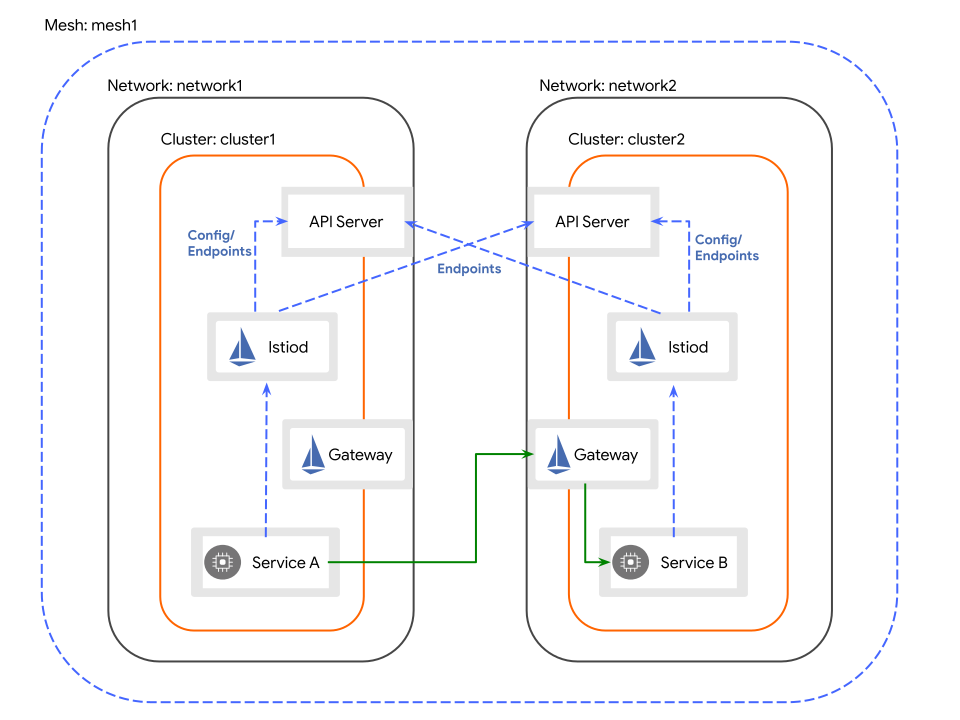
Service workloads across cluster boundaries communicate indirectly, via dedicated gateways for east-west traffic. The gateway in each cluster must be reachable from the other cluster.
Prerequisites
- You have installed the Alauda Container Platform Networking for Multus plugin all of the clusters that comprise the mesh, and kube-ovn must be v4.1.5 or later.
- You have access to two clusters with external load balancer support.
- You have installed the Alauda Service Mesh v2 Operator on all of the clusters that comprise the mesh.
- You have completed Creating certificates for a multi-cluster mesh.
- You have completed Applying certificates to a multi-cluster topology.
- You have
istioctlinstalled locally so that you can use to run these instructions.
TOC
ProcedureVerifying a multi-cluster topologyRemoving a multi-cluster topology from a development environmentProcedure
Create an ISTIO_VERSION environment variable that defines the Istio version to install
Install IstioCNI on the East cluster
Install the IstioCNI resource on the East cluster by running the following command:
Install Istio on the East cluster
-
Create an
Istioresource on the East cluster by running the following command: -
Wait for the control plane to return the
Readystatus condition by running the following command: -
Create an East-West gateway on the East cluster by running the following command:
WARNINGFor nodes running Linux kernel versions earlier than 4.11 (e.g., CentOS 7), additional configuration is required prior to gateway installation.
Optional : Deploy the East-West gateway to Infra Nodes (click to expand)
Run the following command to patch the gateway deployment:
-
Expose the services through the gateway by running the following command:
Install IstioCNI on the West cluster
Install the IstioCNI resource on the West cluster by running the following command:
Install Istio on the West cluster
-
Create an
Istioresource on the West cluster by running the following command: -
Wait for the control plane to return the
Readystatus condition by running the following command: -
Create an East-West gateway on the West cluster by running the following command:
WARNINGFor nodes running Linux kernel versions earlier than 4.11 (e.g., CentOS 7), additional configuration is required prior to gateway installation.
Optional : Deploy the East-West gateway to Infra Nodes (click to expand)
Run the following command to patch the gateway deployment:
-
Expose the services through the gateway by running the following command:
Install a remote secret on the East cluster that provides access to the API server on the West cluster
Install a remote secret on the West cluster that provides access to the API server on the East cluster
Verifying a multi-cluster topology
To confirm that your multi-cluster topology is functioning correctly, you will deploy sample applications onto two separate Alauda Container Platform clusters. The goal is to establish a baseline environment where cross-cluster traffic can be generated and observed.
Procedure
Begin by deploying the necessary sample applications onto the East cluster.
This cluster will host the v1 version of the helloworld service.
-
Create a dedicated namespace for the applications on the
Eastcluster. -
Enable automatic Istio sidecar injection for the
samplenamespace by applying the required label. -
Deploy the
helloworldapplication components.a. First, establish the
helloworldservice endpoint.b. Then, deploy the
v1instance of thehelloworldapplication. -
Deploy the
sleepapplication, which will act as a client for sending test requests. -
Pause the process until the
helloworld-v1deployment is fully available and ready. -
Likewise, wait for the
sleepdeployment to report aReadystatus.
Replicate the setup on the West cluster.
This cluster will host the v2 version of the helloworld service.
-
Create the
samplenamespace on theWestcluster. -
Enable Istio sidecar injection for this namespace as well.
-
Deploy the
helloworldapplication components.a. Create the common
helloworldservice endpoint on theWestcluster.b. Deploy the
v2instance of thehelloworldapplication. -
Deploy the client
sleepapplication on theWestcluster. -
Wait for the
helloworld-v2deployment to become fully available. -
Finally, ensure the
sleepdeployment on theWestcluster is ready.
Verifying traffic flows between clusters
With the applications deployed and running on both clusters, the next step is to send requests and confirm that traffic is being correctly load-balanced across the entire service mesh.
-
From a pod within the
Eastcluster, send a series of 10 requests to thehelloworldservice.The expected outcome is a mix of responses from both
helloworld-v1(East) andhelloworld-v2(West), proving that the service mesh is routing requests across cluster boundaries.Example output
-
Perform the same test from the
Westcluster.Again, you should observe responses from both
v1andv2of the service, confirming that the multi-cluster load balancing is working correctly regardless of where the request originates.
Removing a multi-cluster topology from a development environment
After completing your verification and experimentation, you should dismantle the multi-cluster configuration to clean up the development environment and release resources.
Procedure
-
Execute a single command to remove all Istio components and the sample applications from the
Eastcluster. -
Run the corresponding command to perform the same cleanup operation on the
Westcluster.