安装 primary-remote 多网络网格

在两个集群上以 primary-remote 多网络拓扑安装 Istio。

NOTE

在本操作步骤中,CLUSTER1East 集群,CLUSTER2West 集群。East 集群为主集群,West 集群为远程集群。

您可以根据需要调整这些说明,以适应跨越两个以上集群的网格。

拓扑结构

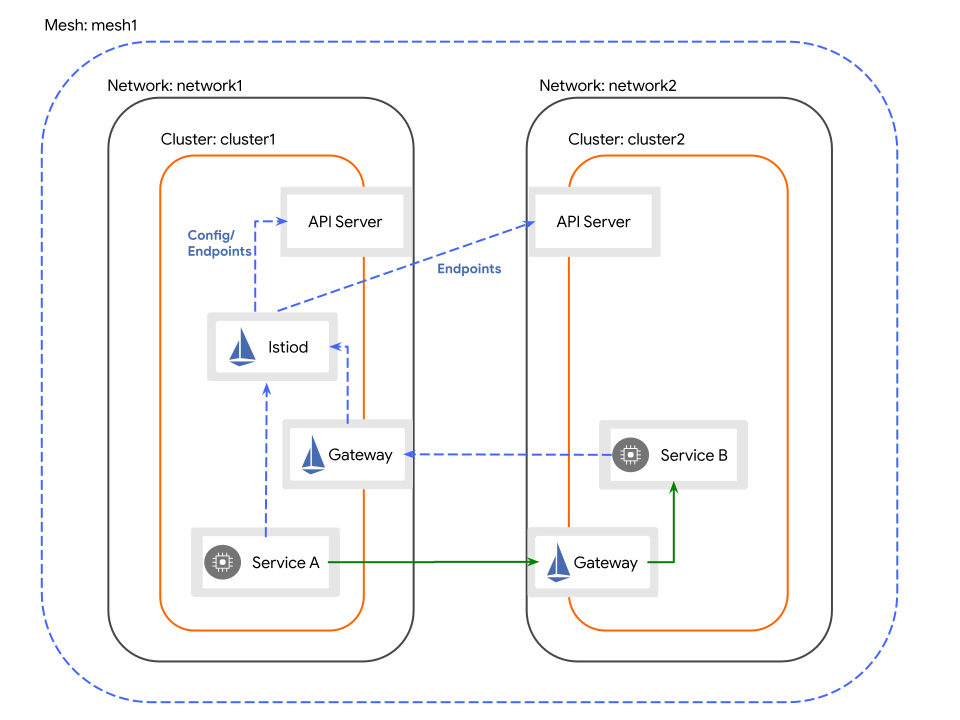
跨集群边界的服务工作负载通过专用的东西向网关间接通信。 每个集群中的网关必须能被其他集群访问。

cluster2 中的服务将通过相同的东西向网关访问 cluster1 中的控制平面。

Primary-Remote 多网络拓扑

前提条件

  • 您已在组成网格的所有集群中安装了 Alauda Container Platform Networking 的 Multus 插件,且 kube-ovn 版本必须为 v4.1.5 或更高。
  • 您拥有支持外部负载均衡器的两个集群访问权限。
    WARNING

    在 primary-remote 模式下,如果外部负载均衡器地址是 IPv6 的 IP,当前不支持 primary-remote 部署。

  • 您已在组成网格的所有集群中安装了 Alauda Service Mesh v2 Operator。
  • 您已完成为多集群网格创建证书
  • 您已完成将证书应用于多网络多集群拓扑
  • 您已在本地安装了 istioctl,以便执行以下操作步骤。

操作步骤

创建定义要安装的 Istio 版本的 ISTIO_VERSION 环境变量

export ISTIO_VERSION=1.28.3

East 集群上安装 IstioCNI

通过运行以下命令在 East 集群上安装 IstioCNI 资源:

kubectl --context "${CTX_CLUSTER1}" create namespace istio-cni
cat <<EOF | kubectl --context "${CTX_CLUSTER1}" apply -f -
apiVersion: sailoperator.io/v1
kind: IstioCNI
metadata:
  name: default
spec:
  version: v${ISTIO_VERSION}
  namespace: istio-cni
  values:
    cni:
      cniConfDir: /etc/cni/multus/net.d # ACP 4.0 中为 /etc/cni/net.d
      excludeNamespaces:
        - istio-cni
        - kube-system
EOF

East 集群上安装 Istio

  1. 通过运行以下命令在 East 集群上创建 Istio 资源:

    将以下 Istio 资源保存为 istio-external.yaml

    istio-external.yaml
    apiVersion: sailoperator.io/v1
    kind: Istio
    metadata:
      name: default
    spec:
      version: v${ISTIO_VERSION}
      namespace: istio-system
      values:
        global:
          meshID: mesh1
          multiCluster:
            clusterName: cluster1
          network: network1
          externalIstiod: true
    1. 这使得安装在 East 集群上的控制平面能够作为其他远程集群的外部控制平面。

    使用 kubectl 应用 Istio 资源:

    envsubst < istio-external.yaml | kubectl --context "${CTX_CLUSTER1}" apply -f -
  2. 通过运行以下命令等待控制平面返回 "Ready" 状态条件:

    kubectl --context "${CTX_CLUSTER1}" wait --for condition=Ready istio/default --timeout=3m
  3. 通过运行以下命令在 East 集群上创建东西向网关:

    WARNING

    对于运行 Linux 内核版本早于 4.11 的节点(例如 CentOS 7),在安装网关之前需要进行额外配置

    kubectl --context "${CTX_CLUSTER1}" apply -f https://raw.githubusercontent.com/alauda-mesh/sail-operator/main/docs/deployment-models/resources/east-west-gateway-net1.yaml
    可选:将东西向网关部署到 Infra Nodes(点击展开)

    运行以下命令以修补网关部署:

    kubectl --context "${CTX_CLUSTER1}" patch deployment istio-eastwestgateway -n istio-system \
      --type='merge' \
      --patch '{
        "spec": {
          "template": {
            "spec": {
              "nodeSelector": {
                "node-role.kubernetes.io/infra": ""
              },
              "tolerations": [
                {
                  "effect": "NoSchedule",
                  "key": "node-role.kubernetes.io/infra",
                  "value": "reserved",
                  "operator": "Equal"
                }
              ]
            }
          }
        }
      }'
  4. 通过运行以下命令通过网关暴露控制平面,使 West 集群中的服务能够访问控制平面:

    kubectl --context "${CTX_CLUSTER1}" apply -n istio-system -f https://raw.githubusercontent.com/alauda-mesh/sail-operator/main/docs/deployment-models/resources/expose-istiod.yaml
  5. 通过运行以下命令通过网关暴露应用服务:

    kubectl --context "${CTX_CLUSTER1}" apply -n istio-system -f https://raw.githubusercontent.com/alauda-mesh/sail-operator/main/docs/deployment-models/resources/expose-services.yaml

West 集群上安装 IstioCNI

通过运行以下命令在 West 集群上安装 IstioCNI 资源:

kubectl --context "${CTX_CLUSTER2}" create namespace istio-cni
cat <<EOF | kubectl --context "${CTX_CLUSTER2}" apply -f -
apiVersion: sailoperator.io/v1
kind: IstioCNI
metadata:
  name: default
spec:
  version: v${ISTIO_VERSION}
  namespace: istio-cni
  values:
    cni:
      cniConfDir: /etc/cni/multus/net.d # ACP 4.0 中为 /etc/cni/net.d
      excludeNamespaces:
        - istio-cni
        - kube-system
EOF

West 集群上安装 Istio

  1. 通过运行以下命令保存运行在 East 集群中的东西向网关的 IP 地址:

    export DISCOVERY_ADDRESS=$(kubectl --context="${CTX_CLUSTER1}" \
       -n istio-system get svc istio-eastwestgateway \
       -o jsonpath='{.status.loadBalancer.ingress[0].ip}')
    echo "DISCOVERY_ADDRESS=${DISCOVERY_ADDRESS}"
  2. 通过运行以下命令在 West 集群上创建 Istio 资源:

    cat <<EOF | kubectl --context "${CTX_CLUSTER2}" apply -f -
    apiVersion: sailoperator.io/v1
    kind: Istio
    metadata:
      name: default
    spec:
      version: v${ISTIO_VERSION}
      namespace: istio-system
      profile: remote
      values:
        istiodRemote:
          injectionPath: /inject/cluster/cluster2/net/network2
        global:
          remotePilotAddress: ${DISCOVERY_ADDRESS}
    EOF
  3. 通过运行以下命令为 West 集群中的 istio-system 命名空间添加注解,使其由 East 集群的控制平面管理:

    kubectl --context="${CTX_CLUSTER2}" annotate namespace istio-system topology.istio.io/controlPlaneClusters=cluster1
  4. 通过运行以下命令在 East 集群上安装远程 secret,以便访问 West 集群的 API 服务器:

    istioctl create-remote-secret \
      --context="${CTX_CLUSTER2}" \
      --name=cluster2 | \
      kubectl --context="${CTX_CLUSTER1}" apply -f -
  5. 通过运行以下命令等待 Istio 资源返回 "Ready" 状态条件:

    kubectl --context "${CTX_CLUSTER2}" wait --for condition=Ready istio/default --timeout=3m
  6. 通过运行以下命令在 West 集群上创建东西向网关:

    WARNING

    对于运行 Linux 内核版本早于 4.11 的节点(例如 CentOS 7),在安装网关之前需要进行额外配置

    kubectl --context "${CTX_CLUSTER2}" apply -f https://raw.githubusercontent.com/alauda-mesh/sail-operator/main/docs/deployment-models/resources/east-west-gateway-net2.yaml
    可选:将东西向网关部署到 Infra Nodes(点击展开)

    运行以下命令以修补网关部署:

    kubectl --context "${CTX_CLUSTER2}" patch deployment istio-eastwestgateway -n istio-system \
      --type='merge' \
      --patch '{
        "spec": {
          "template": {
            "spec": {
              "nodeSelector": {
                "node-role.kubernetes.io/infra": ""
              },
              "tolerations": [
                {
                  "effect": "NoSchedule",
                  "key": "node-role.kubernetes.io/infra",
                  "value": "reserved",
                  "operator": "Equal"
                }
              ]
            }
          }
        }
      }'
    NOTE

    由于 West 集群安装的是远程配置文件,在 East 集群上暴露应用服务会使其在两个集群的东西向网关上都被暴露。

验证 primary-remote 拓扑

为了确认您的 primary-remote 拓扑正常工作,您将把示例应用部署到两个独立的 Alauda Container Platform 集群。目标是建立一个基线环境,以便生成和观察跨集群流量。

操作步骤

首先在 East 集群上部署所需的示例应用。

该集群将托管 helloworld 服务的 v1 版本。

  1. East 集群上为应用创建专用命名空间。

    kubectl --context="${CTX_CLUSTER1}" create namespace sample
  2. 通过应用标签启用 sample 命名空间的自动 Istio sidecar 注入。

    kubectl --context="${CTX_CLUSTER1}" label namespace sample istio-injection=enabled
  3. 部署 helloworld 应用组件。

    a. 首先,创建 helloworld 服务端点。

    kubectl --context="${CTX_CLUSTER1}" apply \
      -l service=helloworld -n sample \
      -f https://raw.githubusercontent.com/istio/istio/refs/heads/master/samples/helloworld/helloworld.yaml

    b. 然后,部署 helloworld 应用的 v1 实例。

    kubectl --context="${CTX_CLUSTER1}" apply \
      -l version=v1 -n sample \
      -f https://raw.githubusercontent.com/istio/istio/refs/heads/master/samples/helloworld/helloworld.yaml
  4. 部署 sleep 应用,作为发送测试请求的客户端。

    kubectl --context="${CTX_CLUSTER1}" apply \
      -n sample \
      -f https://raw.githubusercontent.com/istio/istio/refs/heads/master/samples/sleep/sleep.yaml
  5. 等待 helloworld-v1 部署完全可用并准备就绪。

    kubectl --context="${CTX_CLUSTER1}" wait --for condition=available -n sample deployment/helloworld-v1
  6. 同样,等待 sleep 部署报告 Ready 状态。

    kubectl --context="${CTX_CLUSTER1}" wait --for condition=available -n sample deployment/sleep

West 集群上重复相同的设置。

该集群将托管 helloworld 服务的 v2 版本。

  1. West 集群上创建 sample 命名空间。

    kubectl --context="${CTX_CLUSTER2}" create namespace sample
  2. 同样启用该命名空间的 Istio sidecar 注入。

    kubectl --context="${CTX_CLUSTER2}" label namespace sample istio-injection=enabled
  3. 部署 helloworld 应用组件。

    a. 在 West 集群上创建通用的 helloworld 服务端点。

    kubectl --context="${CTX_CLUSTER2}" apply \
      -l service=helloworld -n sample \
      -f https://raw.githubusercontent.com/istio/istio/refs/heads/master/samples/helloworld/helloworld.yaml

    b. 部署 helloworld 应用的 v2 实例。

    kubectl --context="${CTX_CLUSTER2}" apply \
      -l version=v2 -n sample \
      -f https://raw.githubusercontent.com/istio/istio/refs/heads/master/samples/helloworld/helloworld.yaml
  4. West 集群上部署客户端 sleep 应用。

    kubectl --context="${CTX_CLUSTER2}" apply \
      -n sample \
      -f https://raw.githubusercontent.com/istio/istio/refs/heads/master/samples/sleep/sleep.yaml
  5. 等待 helloworld-v2 部署完全可用。

    kubectl --context="${CTX_CLUSTER2}" wait --for condition=available -n sample deployment/helloworld-v2
  6. 最后,确保 West 集群上的 sleep 部署已准备就绪。

    kubectl --context="${CTX_CLUSTER2}" wait --for condition=available -n sample deployment/sleep

验证跨集群流量

应用部署并在两个集群上运行后,下一步是发送请求并确认流量是否正确地在整个服务网格中负载均衡。

  1. East 集群中的一个 pod 发送 10 个请求到 helloworld 服务。

    for i in {0..9}; do \
      kubectl --context="${CTX_CLUSTER1}" exec -n sample deploy/sleep -c sleep -- curl -sS helloworld.sample:5000/hello; \
    done

    预期结果是同时收到来自 helloworld-v1East)和 helloworld-v2West)的响应,证明服务网格已跨集群边界路由请求。

    示例输出
    Hello version: v1, instance: helloworld-v1-644474db4b-7cwhz
    Hello version: v2, instance: helloworld-v2-645cb7fc46-lnbb7
    Hello version: v1, instance: helloworld-v1-644474db4b-7cwhz
    Hello version: v1, instance: helloworld-v1-644474db4b-7cwhz
    Hello version: v1, instance: helloworld-v1-644474db4b-7cwhz
    Hello version: v2, instance: helloworld-v2-645cb7fc46-lnbb7
    Hello version: v2, instance: helloworld-v2-645cb7fc46-lnbb7
    Hello version: v1, instance: helloworld-v1-644474db4b-7cwhz
    Hello version: v2, instance: helloworld-v2-645cb7fc46-lnbb7
    Hello version: v1, instance: helloworld-v1-644474db4b-7cwhz
  2. West 集群执行相同测试。

    for i in {0..9}; do \
      kubectl --context="${CTX_CLUSTER2}" exec -n sample deploy/sleep -c sleep -- curl -sS helloworld.sample:5000/hello; \
    done

    同样,您应观察到来自服务的 v1v2 响应,确认 primary-remote 负载均衡无论请求来源于何处均正常工作。

从开发环境中移除 primary-remote 拓扑

完成验证和实验后,应拆除 primary-remote 配置,以清理开发环境并释放资源。

操作步骤

  1. 运行单条命令,从 East 集群中删除所有 Istio 组件和示例应用。

    kubectl --context="${CTX_CLUSTER1}" delete istio/default istiocni/default ns/sample ns/istio-system ns/istio-cni
  2. 运行对应命令,在 West 集群上执行相同的清理操作。

    kubectl --context="${CTX_CLUSTER2}" delete istio/default istiocni/default ns/sample ns/istio-system ns/istio-cni