如何自定义部署模板
Deprecated: Nexus 3.81 (nexus-ce-operator v3.81.1 and v3.81.2)
由于 Nexus 3.81 Community Edition 的限制性约束,该版本已停止提供。一旦使用量达到配额上限(总组件数 100,000 个、每日请求数 200,000 次),该实例将无法正常工作。
如果你已经升级到 3.81 版本,请按照 Rollback to Nexus 3.76 指南降级。
有关 Community Edition 限制的更多信息,请参阅 Community Edition Limitations。
自定义流程
自定义模板流程如下:
- 配置模板:根据 Configure Template 章节中的说明,按需配置模板内容
- 注册并验证模板:根据 Register and Verify the Template 章节中的说明,将模板注册到目标集群并验证模板内容
配置模板
模板结构
工具部署模板通过 ConfigMap 资源进行定义和管理。每个模板由以下三个主要部分组成:
- 基本信息:包含模板的名称、描述和标签等基础配置信息
- UI 动态表单:定义用户在部署工具时需要填写的表单项
- 部署模板:包含工具部署所需的具体资源定义
apiVersion: v1
kind: ConfigMap
## Part 1: Basic Information
metadata:
  labels:
    tools.cpaas.io/template: gitlabofficial
  name: gitlab-template-quickstart
  namespace: cpaas-system
  annotations:
    ui.cpaas.io/displayName.en: Gitlab Quickstart Template
    ui.cpaas.io/description.en: Deploy a lightweight Gitlab instance, suitable for development and testing scenarios, not recommended for production environments.
## Part 2: UI Dynamic Form
    ui.cpaas.io/descriptors: >-
      - path: storageClass
        x-descriptors:
          - urn:alm:descriptor:label:zh:Gitaly 存储类
          - urn:alm:descriptor:label:en:Gitaly Storage Class
          - 'urn:alm:descriptor:description:zh:选择存储类,用于存放代码仓库'
          - 'urn:alm:descriptor:description:en:Select a storage class for storing repositories'
          - urn:alm:descriptor:com.tectonic.ui:validation:required
          - urn:alm:descriptor:com.tectonic.ui:select:expression
          - urn:alm:descriptor:expression:props.options:api:/kubernetes/${context.cluster}/apis/storage.k8s.io/v1/storageclasses
          - urn:alm:descriptor:expression:props.options:label:path:metadata.name
          - urn:alm:descriptor:expression:props.options:value:path:metadata.name
        ...
## Part 3: Deployment Template
data:
  template: >-
    helmValues:
      gitlab:
        gitaly:
          init:
            resources:
              limits:
                cpu: 1
                memory: 1Gi
              requests:
                cpu: 100m
                memory: 100Mi
          ...
基本信息
基本信息包括模板名称、描述、标签、注释、显示名称和描述。
示例:
kind: ConfigMap
apiVersion: v1
metadata:
  name: gitlab-template-quickstart
  namespace: cpaas-system
  labels:
    tools.cpaas.io/template: gitlabofficial
  annotations:
    ui.cpaas.io/displayName.en: Quick Start Template
    ui.cpaas.io/configuration.en: >-
      Configuration: <br/>
      Compute Resources: CPU 3 cores, Memory 6Gi <br/>
      Storage Method: Use node local storage, need to configure storage node IP and path <br/>
      Network Access: Use NodePort mode, share node IP with storage, need to specify port <br/>
    ui.cpaas.io/description.en: This template is used to quickly create a lightweight GitLab instance, suitable for development and testing scenarios, not recommended for production environments.
UI 动态表单
工具部署 UI 提供了动态表单能力,可根据模板中的表单描述信息自动生成对应的表单界面,从而简化用户的配置流程。
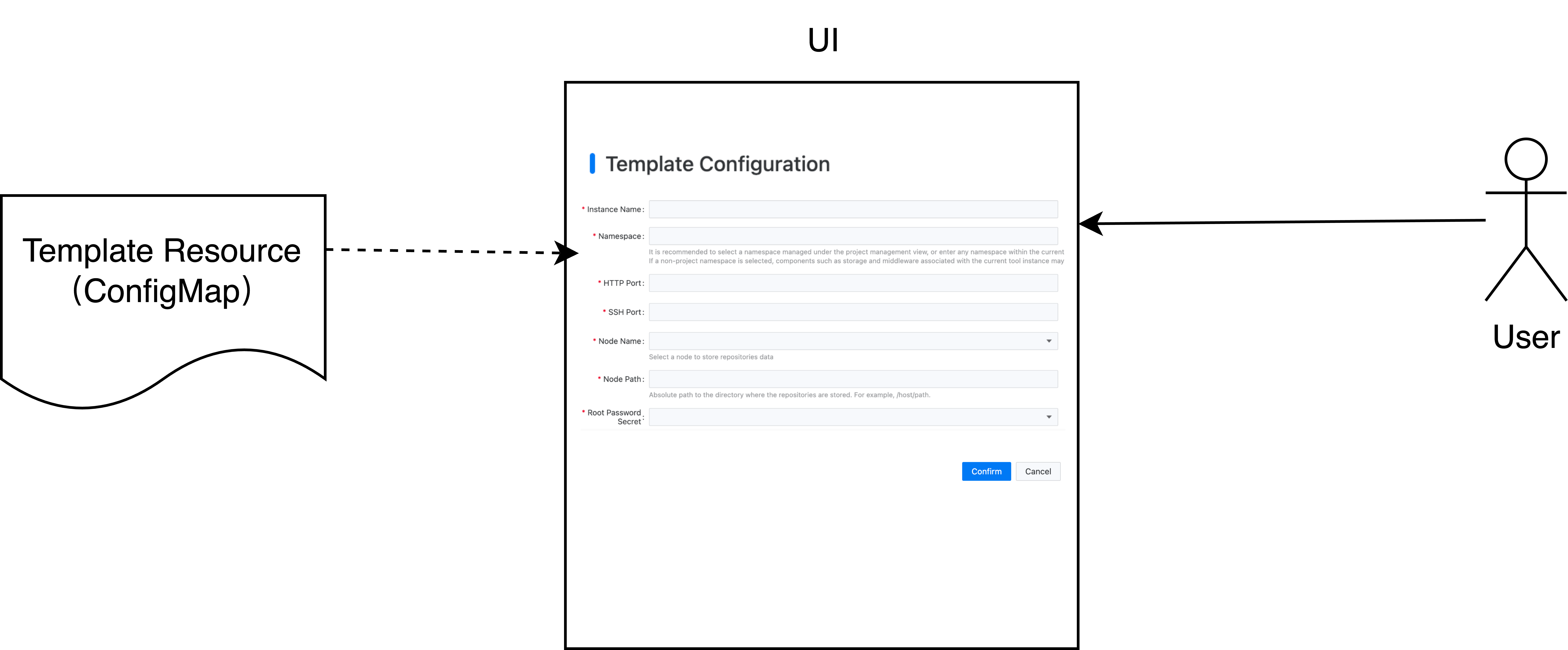
动态表单的配置信息存放在 ui.cpaas.io/descriptors 注解中,具体格式如下:
apiVersion: v1
kind: ConfigMap
metadata:
  annotations:
    ui.cpaas.io/descriptors: >-
      - path: storageClass
        x-descriptors:
          - urn:alm:descriptor:label:zh:Gitaly 存储类
          - urn:alm:descriptor:label:en:Gitaly Storage Class
          - 'urn:alm:descriptor:description:zh:选择存储类,用于存放代码仓库'
          - 'urn:alm:descriptor:description:en:Select a storage class for storing repositories'
          - urn:alm:descriptor:com.tectonic.ui:validation:required
          - urn:alm:descriptor:com.tectonic.ui:select:expression
          - urn:alm:descriptor:expression:props.options:api:/kubernetes/${context.cluster}/apis/storage.k8s.io/v1/storageclasses
          - urn:alm:descriptor:expression:props.options:label:path:metadata.name
          - urn:alm:descriptor:expression:props.options:value:path:metadata.name
      - path: storageSize
        x-descriptors:
          - urn:alm:descriptor:com.tectonic.ui:text
          - urn:alm:descriptor:com.tectonic.ui:validation:required
          - urn:alm:descriptor:label:en:Gitaly Storage Size
          - urn:alm:descriptor:label:zh:Gitaly 容量
          - urn:alm:descriptor:description:en:To declare the persistent storage capacity, a unit is required, such as 10Gi.
          - urn:alm:descriptor:description:zh:声明持久化存储容量,需要带单位,如 10Gi。
有关动态表单支持的控件类型,请参阅 Configure Dynamic Form 章节。
部署模板
模板引擎基于 Helm Template 实现,并支持所有 Helm 内置的 template functions,例如字符串处理、数学运算、流程控制等。你可以使用这些函数构建灵活的部署模板。
模板的主要作用是将输入参数替换到预定义模板中。输入参数主要来自两个来源:
- 用户在表单中输入的值
- 从 Kubernetes 资源中获取的配置信息
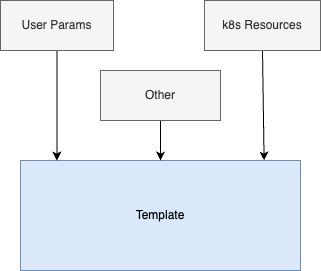
从用户输入中获取参数
在模板中,你可以使用 {{ .Values.<field name> }} 语法获取用户输入的值。例如,如果表单中定义了一个名为 domain 的字段用于输入部署域名,那么在模板中可以使用 {{ .Values.domain }} 引用该值。
apiVersion: v1
kind: ConfigMap
metadata:
  name: gitlab-template
  ...
  annotations:
    ui.cpaas.io/descriptors: >-
      - path: domain
        x-descriptors:
          - urn:alm:descriptor:com.tectonic.ui:text
          - urn:alm:descriptor:label:zh:域名
          - urn:alm:descriptor:label:en:Domain
          - urn:alm:descriptor:com.tectonic.ui:validation:required
spec:
  template: |
    ...
    global:
      hosts:
        domain: {{ .Values.domain }}
        gitlab:
          hostnameOverride: {{ .Values.domain }}
          https: false
          name: {{ .Values.domain }}
        ssh: {{ .Values.domain }}
从 k8s 资源中获取参数
在模板中,你可以使用 Helm Template 提供的 lookup 函数从 Kubernetes 资源中获取配置信息。例如,要从 tools 命名空间下的 gitlab-redis Secret 资源中获取 Redis 连接信息(如 Host、Port),可以按如下方式使用 lookup 函数:
apiVersion: v1
kind: ConfigMap
metadata:
  name: gitlab-template
  ...
spec:
  template: |
    ...
    global:
      {{- $secret := (lookup "v1" "Secret" "tools" "gitlab-redis") }}
      redis:
        host: {{ $secret.data.host | b64dec | trim }}
        port: {{ $secret.data.port | b64dec | trim }}
Secret 的名称也可以由用户输入。例如,如果定义了一个名为 redisSecret 的字段,则可以在模板中使用 .Values.redisSecret 引用用户输入的 Secret 名称。
apiVersion: v1
kind: ConfigMap
metadata:
  name: gitlab-template
  ...
  annotations:
    ui.cpaas.io/descriptors: >-
      - path: redisSecret
        x-descriptors:
          - urn:alm:descriptor:label:zh:Redis 凭据
          - urn:alm:descriptor:label:en:Redis Secret
          - urn:alm:descriptor:com.tectonic.ui:validation:required
spec:
  template: |
    ...
    global:
      {{- $secret := (lookup "v1" "Secret" "tools" .Values.redisSecret) }}
      redis:
        host: {{ .Values.redisSecret.host }}
        port: {{ .Values.redisSecret.port }}
配置国际化
模板支持国际化配置。在 UI 中展示时,会根据用户选择的语言显示对应的名称和描述。
支持的国际化配置注解包括:
ui.cpaas.io/displayName.<language>ui.cpaas.io/description.<language>ui.cpaas.io/configuration.<language>
配置国际化时,只需在字段末尾添加语言代码,例如:
示例:
kind: ConfigMap
apiVersion: v1
metadata:
  annotations:
    ui.cpaas.io/displayName.zh: 快速开始模板
    ui.cpaas.io/displayName.en: Quick Start Template
控件类型
常见的控件类型包括:字符串、数字和下拉框。
示例:
- path: name
  x-descriptors:
    - urn:alm:descriptor:com.tectonic.ui:text
- path: age
  x-descriptors:
    - urn:alm:descriptor:com.tectonic.ui:number
- path: gender
  x-descriptors:
    - urn:alm:descriptor:com.tectonic.ui:select:expression
动态表单变量
描述动态表单时,可以使用以下变量:
${context.cluster}:当前集群名称${context.namespace}:当前命名空间(用户选择部署工具所在的命名空间)
示例:
x-descriptors:
  - urn:alm:descriptor:com.tectonic.ui:select:expression
  - urn:alm:descriptor:expression:props.options:api:/kubernetes/${context.cluster}/api/v1/namespaces/${context.namespace}/secrets?fieldSelector=type!=kubernetes.io/tls
  ...
控件国际化
工具部署模板支持为控件名称、描述和占位符配置国际化显示内容。通过在 x-descriptors 中添加带语言代码的描述符,系统可以根据用户的语言偏好动态显示对应文本。
支持的国际化配置类型包括:
- 控件名称(label):
urn:alm:descriptor:label:<language>:<name>
- 控件描述(description):
urn:alm:descriptor:description:<language>:<description>
- 控件占位符(placeholder):
urn:alm:descriptor:placeholder:<language>:<placeholder>
其中 <language> 为语言代码,当前支持:
示例:配置一个支持中英文的域名输入框:
x-descriptors:
  - urn:alm:descriptor:label:zh:Domain
  - urn:alm:descriptor:label:en:Domain
控件显示信息
动态表单控件支持配置国际化显示内容。在 UI 中展示时,会根据用户选择的语言显示对应的名称和描述。

字段校验
动态表单支持校验用户输入。支持的校验规则如下:
示例 1:限制取值范围为 30000 ~ 32767
x-descriptors:
  - urn:alm:descriptor:com.tectonic.ui:number
  - urn:alm:descriptor:com.tectonic.ui:validation:minimum:30000
  - urn:alm:descriptor:com.tectonic.ui:validation:maximum:32767
示例 2:限制字符串字段为必填
x-descriptors:
  - urn:alm:descriptor:com.tectonic.ui:text
  - urn:alm:descriptor:com.tectonic.ui:validation:required
示例 3:限制用户输入的路径为绝对路径
x-descriptors:
  - urn:alm:descriptor:label:zh:Node Path
  - urn:alm:descriptor:com.tectonic.ui:text
  - urn:alm:descriptor:com.tectonic.ui:validation:pattern:^\/([\w+-]+\/)*([\w+-]+)$
示例 4:限制用户输入长度为 2-32 个字符
x-descriptors:
  - urn:alm:descriptor:com.tectonic.ui:text
  - urn:alm:descriptor:com.tectonic.ui:validation:minLength:2
  - urn:alm:descriptor:com.tectonic.ui:validation:maxLength:32
动态选择
动态表单支持通过调用 API 动态加载选项列表。
示例:获取测试集群 devops 命名空间下的 Secret 资源,并以 metadata.name 作为选项的显示名称和值。
x-descriptors:
  - urn:alm:descriptor:com.tectonic.ui:select:expression
  - urn:alm:descriptor:expression:props.options:api:/kubernetes/test/api/v1/namespaces/devops/secrets?fieldSelector=type!=kubernetes.io/tls
  - urn:alm:descriptor:expression:props.options:label:path:metadata.name
  - urn:alm:descriptor:expression:props.options:value:path:metadata.name
注册并验证模板
-
注册自定义模板:
- 在目标集群的
cpaas-system 命名空间中创建模板资源(ConfigMap),即可完成注册。
-
验证模板注册:
- 进入工具 operator 详情页
- 单击
Create Resource 按钮,进入模板选择页面
- 如果可以看到新添加的模板,说明注册成功
-
验证模板内容:
- 进入工具 operator 详情页
- 单击
Create Resource 按钮,进入模板选择页面
- 如果可以看到新添加的模板,说明注册成功
-
验证模板内容:
- 选择自定义模板
- 按照界面提示创建工具实例
- 如果工具实例可以成功部署,说明模板内容正确
常见问题
如何访问内置模板内容?
工具 operator 部署后,会自动在当前集群的 cpaas-system 命名空间中注册内置部署模板。你可以通过以下路径查看模板内容:
- 进入平台
Management View
- 选择
Cluster Management > Resource Management
- 将资源类型选择为
ConfigMap
- 搜索关键字
template,找到对应模板
如何隐藏产品的内置模板?
如果需要隐藏产品的内置模板,可以在模板资源上添加 ui.cpaas.io/hidden 标签并将其设置为 true。此外,还需要添加 skip-sync 注解;否则,operator 在重启或升级时会恢复模板内容。
metadata:
  labels:
    ui.cpaas.io/hidden: "true"
  annotations:
    skip-sync: "true"
