How to Customize Deployment Templates
自定义流程
自定义模板的流程如下:
- 配置模板:根据 配置模板 章节中的说明,按需配置模板内容
- 注册并验证模板:根据 注册并验证模板 章节中的说明,在目标集群中注册模板并验证模板内容
配置模板
模板结构
工具部署模板通过 ConfigMap 资源进行定义和管理。每个模板由以下三部分组成:
- 基本信息:包含模板的名称、描述和标签等基础配置信息
- UI 动态表单:定义用户在部署工具时需要填写的表单项
- 部署模板:包含工具部署所需的具体资源定义
apiVersion: v1
kind: ConfigMap
## Part 1: Basic Information
metadata:
  labels:
    tools.cpaas.io/template: harbor
  name: harbor-template-quickstart
  namespace: cpaas-system
  annotations:
    ui.cpaas.io/displayName.en: Quick Start Template
    ui.cpaas.io/description.en: This template is used to quickly create a lightweight Harbor instance, suitable for development and testing scenarios, not recommended for production environments.
## Part 2: UI Dynamic Form
    ui.cpaas.io/descriptors: >-
      - path: httpPort
        x-descriptors:
          - urn:alm:descriptor:label:zh:HTTP 端口
          - urn:alm:descriptor:label:en:HTTP Port
          - 'urn:alm:descriptor:description:zh:Harbor 服务访问端口'
          - 'urn:alm:descriptor:description:en:Harbor server port'
          - urn:alm:descriptor:placeholder:zh:输入范围 30000 ~ 32767
          - urn:alm:descriptor:placeholder:en:Input range between 30000 and 32767.
          - urn:alm:descriptor:com.tectonic.ui:validation:required
          - urn:alm:descriptor:com.tectonic.ui:number
          - urn:alm:descriptor:com.tectonic.ui:validation:minimum:30000
          - urn:alm:descriptor:com.tectonic.ui:validation:maximum:32767
        ...
## Part 3: Deployment Template
data:
  template: >-
    externalURL: http://{{ $displayIP }}:{{ .Values.httpPort }}
    helmValues:
      existingSecretAdminPassword: {{ .Values.adminPasswordSecret }}
      existingSecretAdminPasswordKey: password

      externalURL: http://{{ $displayIP }}:{{ .Values.httpPort }}
          ...
基本信息
基本信息包括模板名称、描述、标签、注释、显示名称和描述。
示例:
kind: ConfigMap
apiVersion: v1
metadata:
  name: harbor-template-quickstart
  namespace: cpaas-system
  labels:
    tools.cpaas.io/template: harbor
  annotations:
    ui.cpaas.io/displayName.en: Quick Start Template
    ui.cpaas.io/configuration.en: >-
      Configuration: <br/>
      Compute resources: 2 CPU cores, 4 Gi memory <br/>
      Storage: Use node local storage, configure the storage node IP and path <br/>
      Network access: Use NodePort to access the service, share the node IP with storage, and specify the port <br/>
      Dependencies: Configure existing Redis and PostgreSQL access credentials <br/>
      Other settings: Configure account credentials, SSO feature is disabled by default
    ui.cpaas.io/description.en: This template is used to quickly create a lightweight Harbor instance, suitable for development and testing scenarios, not recommended for production environments.
UI 动态表单
工具部署 UI 提供动态表单功能,可以根据模板中的表单描述信息自动生成对应的表单界面,从而简化用户的配置过程。
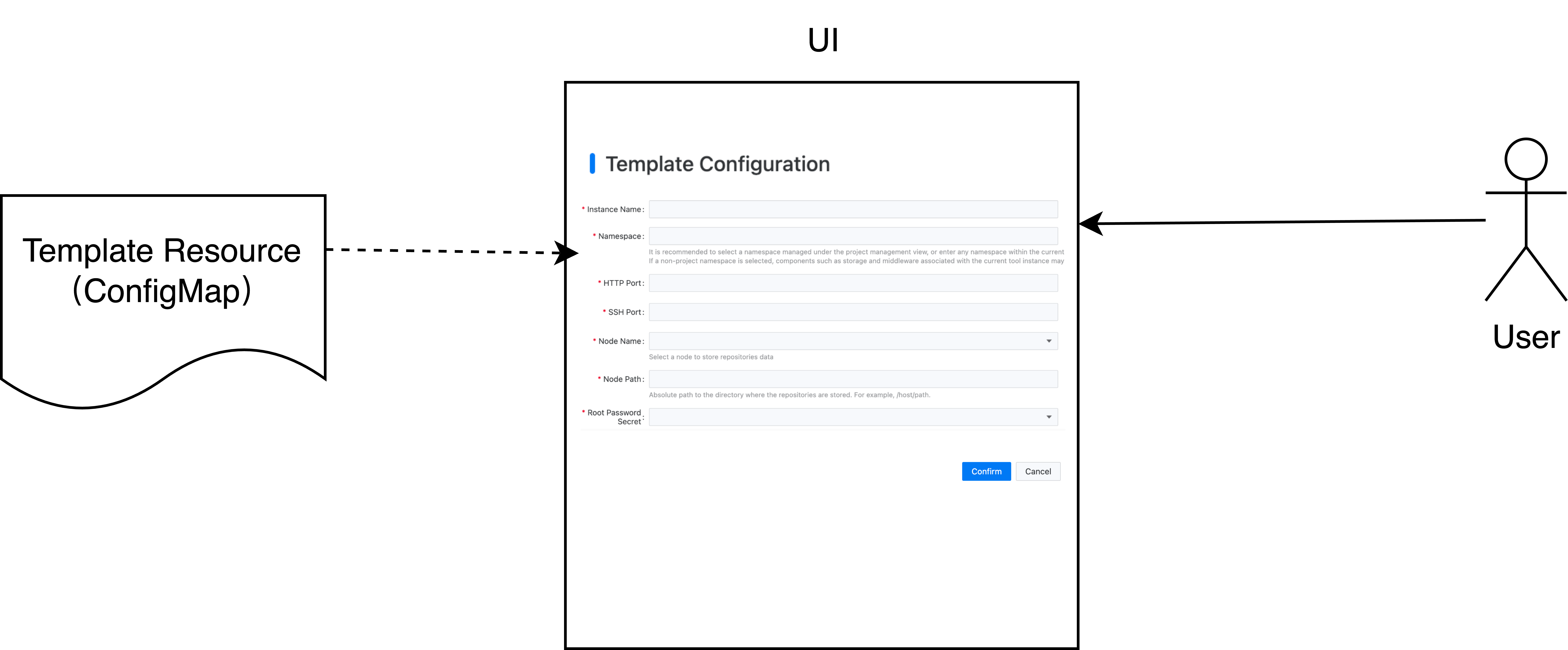
动态表单的配置信息存放在 ui.cpaas.io/descriptors 注解中,具体格式如下:
apiVersion: v1
kind: ConfigMap
metadata:
  annotations:
    ui.cpaas.io/descriptors: >-
      - path: storageClass
        x-descriptors:
          - urn:alm:descriptor:label:zh:Gitaly 存储类
          - urn:alm:descriptor:label:en:Gitaly Storage Class
          - 'urn:alm:descriptor:description:zh:选择存储类,用于存放代码仓库'
          - 'urn:alm:descriptor:description:en:Select a storage class for storing repositories'
          - urn:alm:descriptor:com.tectonic.ui:validation:required
          - urn:alm:descriptor:com.tectonic.ui:select:expression
          - urn:alm:descriptor:expression:props.options:api:/kubernetes/${context.cluster}/apis/storage.k8s.io/v1/storageclasses
          - urn:alm:descriptor:expression:props.options:label:path:metadata.name
          - urn:alm:descriptor:expression:props.options:value:path:metadata.name
      - path: storageSize
        x-descriptors:
          - urn:alm:descriptor:com.tectonic.ui:text
          - urn:alm:descriptor:com.tectonic.ui:validation:required
          - urn:alm:descriptor:label:en:Gitaly Storage Size
          - urn:alm:descriptor:label:zh:Gitaly 容量
          - urn:alm:descriptor:description:en:To declare the persistent storage capacity, a unit is required, such as 10Gi.
          - urn:alm:descriptor:description:zh:声明持久化存储容量,需要带单位,如 10Gi。
关于动态表单支持的控件类型,请参见 配置动态表单 章节。
部署模板
模板引擎基于 Helm Template 实现,并支持所有 Helm 内置的 模板函数,例如字符串处理、数学运算、流程控制等。你可以使用这些函数构建灵活的部署模板。
模板的主要功能是将输入参数替换到预定义模板中。输入参数主要来自两个来源:
- 用户在表单中输入的值
- 从 Kubernetes 资源中获取的配置信息
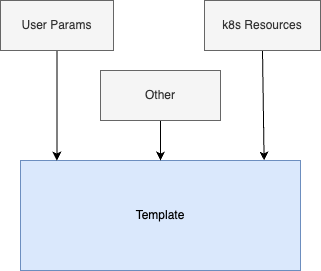
从用户输入获取参数
在模板中,可以使用 {{ .Values.<field name> }} 语法获取用户输入的值。例如,如果表单中定义了一个名为 domain 的字段用于输入部署域名,那么在模板中可以使用 {{ .Values.domain }} 引用该值。
apiVersion: v1
kind: ConfigMap
metadata:
  name: harbor-template
  ...
  annotations:
    ui.cpaas.io/descriptors: >-
      - path: domain
        x-descriptors:
          - urn:alm:descriptor:com.tectonic.ui:text
          - urn:alm:descriptor:com.tectonic.ui:validation:required
          - urn:alm:descriptor:label:en:Domain Name
          - urn:alm:descriptor:label:zh:域名
          - 'urn:alm:descriptor:description:en:'
          - 'urn:alm:descriptor:description:zh:'
spec:
  template: |
    ...
    externalURL: http://{{ .Values.domain }}
    helmValues:
      existingSecretAdminPassword: {{ .Values.adminPasswordSecret }}
      existingSecretAdminPasswordKey: password

      externalURL: http://{{ .Values.domain }}

      expose:
        type: ingress
        tls:
          enabled: false
        ingress:
          hosts:
            core: {{ .Values.domain }}
从 k8s 资源获取参数
在模板中,可以使用 Helm Template 提供的 lookup 函数从 Kubernetes 资源中获取配置信息。例如,要从 tools 命名空间中的 harbor-redis Secret 资源获取 Redis 连接信息(如 Host、Port),可以按如下方式使用 lookup 函数:
apiVersion: v1
kind: ConfigMap
metadata:
  name: harbor-template
  ...
spec:
  template: |
    ...
    global:
      {{- $secret := (lookup "v1" "Secret" "tools" "harbor-redis") }}
      redis:
        host: {{ $secret.data.host | b64dec | trim }}
        port: {{ $secret.data.port | b64dec | trim }}
Secret 的名称也可以由用户输入。例如,如果定义了一个名为 redisSecret 的字段,就可以在模板中使用 .Values.redisSecret 引用用户输入的 Secret 名称。
apiVersion: v1
kind: ConfigMap
metadata:
  name: harbor-template
  ...
  annotations:
    ui.cpaas.io/descriptors: >-
      - path: redisSecret
        x-descriptors:
          - urn:alm:descriptor:label:zh:Redis 凭据
          - urn:alm:descriptor:label:en:Redis Secret
          - urn:alm:descriptor:com.tectonic.ui:validation:required
spec:
  template: |
    ...
    {{- $secret := (lookup "v1" "Secret" .Values.namespace .Values.redisSecret) }}
    redis:
      external:
        {{- if and (hasKey $secret.data "masterName") $secret.data.masterName }}
        addr: "{{ $secret.data.address | b64dec | trim }}"
        sentinelMasterSet: {{ default "mymaster" $secret.data.masterName | b64dec | trim }}
        {{- else }}
        addr: {{ $secret.data.host | b64dec | trim }}:{{ $secret.data.port | b64dec | trim }}
        {{- end }}
        existingSecret: {{ .Values.redisSecret }}
        existingSecretKey: password
      type: external
配置国际化
模板支持国际化配置。在 UI 中显示时,会根据用户选择的语言显示对应的名称和描述。
支持的国际化配置注解包括:
ui.cpaas.io/displayName.<language>ui.cpaas.io/description.<language>ui.cpaas.io/configuration.<language>
配置国际化时,只需在字段末尾添加语言代码,例如:
示例:
kind: ConfigMap
apiVersion: v1
metadata:
  annotations:
    ui.cpaas.io/displayName.zh: 快速开始模板
    ui.cpaas.io/displayName.en: Quick Start Template
控件类型
常见的控件类型包括:字符串、数字和下拉框。
示例:
- path: name
  x-descriptors:
    - urn:alm:descriptor:com.tectonic.ui:text
- path: age
  x-descriptors:
    - urn:alm:descriptor:com.tectonic.ui:number
- path: gender
  x-descriptors:
    - urn:alm:descriptor:com.tectonic.ui:select:expression
动态表单变量
描述动态表单时,可以使用以下变量:
${context.cluster}:当前集群名称${context.namespace}:当前命名空间(用户选择部署工具的命名空间)
示例:
x-descriptors:
  - urn:alm:descriptor:com.tectonic.ui:select:expression
  - urn:alm:descriptor:expression:props.options:api:/kubernetes/${context.cluster}/api/v1/namespaces/${context.namespace}/secrets?fieldSelector=type!=kubernetes.io/tls
  ...
控件国际化
工具部署模板支持配置控件名称、描述和占位符的国际化显示内容。通过在 x-descriptors 中添加带语言代码的描述符,系统可以根据用户的语言偏好动态显示对应文本。
支持的国际化配置类型包括:
- 控件名称(label):
urn:alm:descriptor:label:<language>:<name>
- 控件描述(description):
urn:alm:descriptor:description:<language>:<description>
- 控件占位符(placeholder):
urn:alm:descriptor:placeholder:<language>:<placeholder>
其中 <language> 为语言代码,目前支持:
示例:配置一个支持中英文的域名输入框:
x-descriptors:
  - urn:alm:descriptor:label:zh:Domain
  - urn:alm:descriptor:label:en:Domain
控件显示信息
动态表单控件支持配置国际化显示内容。在 UI 中显示时,会根据用户的语言选择显示对应的名称和描述。

字段校验
动态表单支持对用户输入进行校验。支持的校验规则如下:
示例 1:限制取值范围为 30000 ~ 32767
x-descriptors:
  - urn:alm:descriptor:com.tectonic.ui:number
  - urn:alm:descriptor:com.tectonic.ui:validation:minimum:30000
  - urn:alm:descriptor:com.tectonic.ui:validation:maximum:32767
示例 2:限制字符串字段为必填
x-descriptors:
  - urn:alm:descriptor:com.tectonic.ui:text
  - urn:alm:descriptor:com.tectonic.ui:validation:required
示例 3:限制用户输入的路径为绝对路径
x-descriptors:
  - urn:alm:descriptor:label:zh:Node Path
  - urn:alm:descriptor:com.tectonic.ui:text
  - urn:alm:descriptor:com.tectonic.ui:validation:pattern:^\/([\w+-]+\/)*([\w+-]+)$
示例 4:限制用户输入长度为 2-32 个字符
x-descriptors:
  - urn:alm:descriptor:com.tectonic.ui:text
  - urn:alm:descriptor:com.tectonic.ui:validation:minLength:2
  - urn:alm:descriptor:com.tectonic.ui:validation:maxLength:32
动态选择
动态表单支持通过调用 API 动态加载选项列表。
示例:获取测试集群中 devops 命名空间下的 Secret 资源,并使用 metadata.name 作为选项的显示名称和值。
x-descriptors:
  - urn:alm:descriptor:com.tectonic.ui:select:expression
  - urn:alm:descriptor:expression:props.options:api:/kubernetes/test/api/v1/namespaces/devops/secrets?fieldSelector=type!=kubernetes.io/tls
  - urn:alm:descriptor:expression:props.options:label:path:metadata.name
  - urn:alm:descriptor:expression:props.options:value:path:metadata.name
注册并验证模板
-
注册自定义模板:
- 在目标集群的
cpaas-system 命名空间中创建模板资源(ConfigMap),完成注册。
-
验证模板注册:
- 进入工具 Operator 详情页
- 单击
Create Resource 按钮进入模板选择页面
- 如果可以看到新添加的模板,说明注册成功
-
验证模板内容:
- 进入工具 Operator 详情页
- 单击
Create Resource 按钮进入模板选择页面
- 如果可以看到新添加的模板,说明注册成功
-
验证模板内容:
- 选择自定义模板
- 按照界面提示创建工具实例
- 如果工具实例可以成功部署,说明模板内容正确
常见问题
如何访问内置模板内容?
工具 Operator 部署后,会自动在当前集群的 cpaas-system 命名空间中注册内置部署模板。你可以通过以下路径查看模板内容:
- 进入平台的
Management View
- 选择
Cluster Management > Resource Management
- 将资源类型选择为
ConfigMap
- 搜索关键字
template 查找对应模板
如何隐藏产品的内置模板?
如果需要隐藏产品的内置模板,可以给模板资源添加 ui.cpaas.io/hidden 标签并将其设置为 true。此外,还需要添加 skip-sync 注解;否则 Operator 在重启或升级时会恢复模板内容。
metadata:
  labels:
    ui.cpaas.io/hidden: "true"
  annotations:
    skip-sync: "true"
